Instagram SEO: Five Text Fields That Get Your Posts Found
Instagram SEO in 2026: where to put keywords so your profile and posts rank in Instagram search and Google, with examples for Indian businesses.

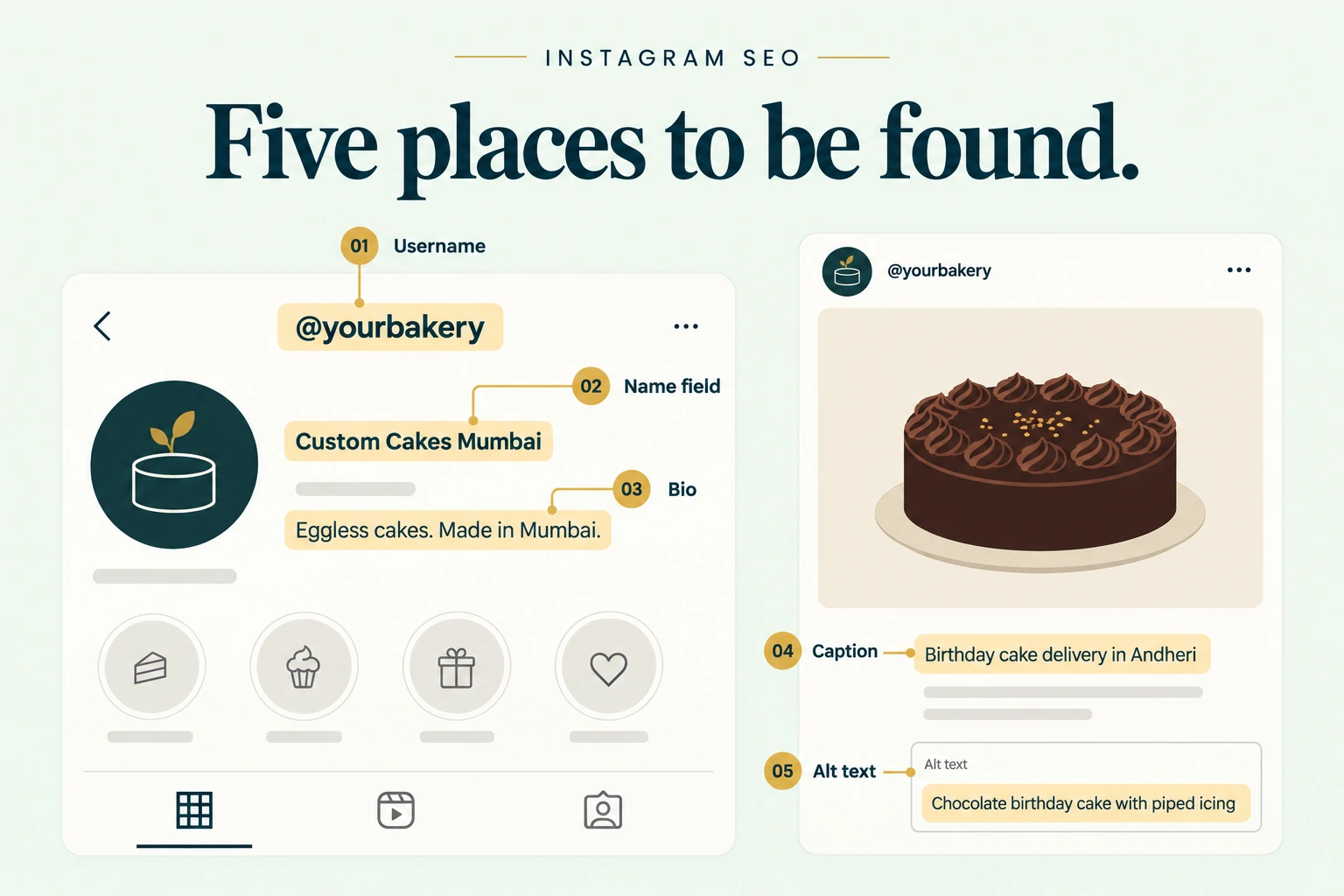
The short answer
Instagram SEO means putting the words your buyer searches for into the text Instagram reads: your username, name field, bio, captions and alt text. Instagram says the search text itself is the most important search signal, followed by your activity and a result’s popularity. Since 10 July 2025, public posts from business and creator accounts can also appear in Google results. So one well-written caption now works in two search engines. Hashtags help a little, as labels. They are capped at five per post.
Key takeaways
- Instagram’s own tips: use a handle and profile name related to your content, put keywords in your bio, and put keywords in captions, not comments
- The name field is the highest-value spot most businesses waste on just the brand name
- The first line of a caption now doubles as a Google snippet. Write it like a search result title
- Indian users search in Hinglish and regional languages. Include the words they use
- Check that “Allow public photos and videos to appear in search engine results” is on
How Instagram search works
In 2021 Instagram explained its search ranking. The signals, in order of importance:
- Your search text. “By far the most important signal.” Instagram matches it against usernames, bios, captions, hashtags and places
- Your activity. Accounts you follow, posts you’ve viewed and how you’ve interacted
- Popularity. Clicks, likes, shares and follows for a result
You can’t control a searcher’s activity. You can control the text Instagram matches against, and you can earn popularity with good content. Instagram SEO is mostly the first job.
The Five Text Fields
Here they are in the order we’d fix them. The first two affect every search for your account. The last three affect each post.
Field 1: Username (the @handle)
Keep it short and close to your brand name. If your brand name is generic, add your category. @sharmadentalclinic beats @drsharma_01. Change it rarely: every change breaks old tags and mentions.
Field 2: Name field
This is the bold text above your bio. It is searchable and it is separate from your username. Most brands just repeat the brand name here. Add your main keyword instead.
- A Bandra bakery: “Bloom Bakery | Custom Cakes Mumbai”
- A Pune CA firm: “Mehta & Co | GST & Tax CA Pune”
- A D2C brand: “Kora | Ayurvedic Skincare”
Keep it readable. Stuffing it with five keywords looks like spam to people, and they’re the ones who decide to follow.
Field 3: Bio
Instagram’s own advice is to “include keywords about who you are and what your profile is about.” You have 150 characters. Use one or two keywords naturally, then a reason to believe and a next step. Our guide to writing a business bio has worked examples.
Field 4: Caption, especially the first line
Instagram says to put keywords in captions, not comments. The first line matters most. It is what users see before “more”, and it is likely to be what Google shows.
Compare:
- Weak: “Weekend vibes 😍✨”
- Strong: “Eggless chocolate truffle cake in Mumbai: what we changed to keep it moist”
The strong line answers a search. It still reads like a person wrote it.
Then use hashtags as labels. Since December 2025 you get five at most. Our guide to the five-hashtag limit explains how to choose them.
Field 5: Alt text and on-screen text
Instagram generates alt text automatically, but you can write your own under Advanced settings before posting. Describe what is in the image in a plain sentence. It helps people using screen readers, and it gives search systems more accurate text.
For Reels, say your keyword out loud and put it in the on-screen title. Make it visible in the first frames.
Your posts now appear on Google
Since 10 July 2025, Google can index public photos, videos, carousels and Reels from professional accounts of users over 18. It is switched on by default. Personal and private accounts aren’t affected.
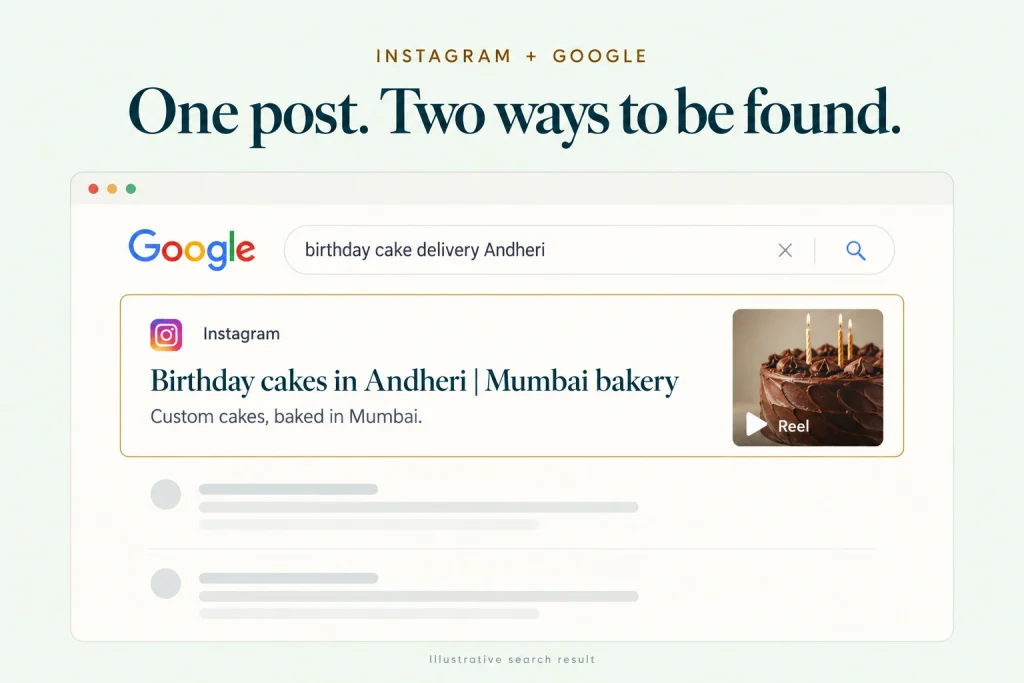
To check: Settings › Privacy › “Allow public photos and videos to appear in search engine results.” Leave it on unless you have a reason not to.
This matters most for local businesses. Someone searching “birthday cake delivery Andheri” might now see a bakery’s Reel next to its Google Business Profile. Instagram is now part of your local SEO, not separate from it.
What it means for writing:
- Treat each caption’s first line as a title tag
- Name the city or neighbourhood when location matters
- Keep one topic per post. A caption about three different products ranks for none of them
Finding keywords Indian buyers actually use
Start where your buyers type.
Instagram’s own search bar. Type the start of a phrase and note the suggestions.
Google autocomplete and “People also ask”. Now that posts can rank on Google, Google’s suggestions are directly useful.
Your DMs and comments. Customers tell you their words. A Jaipur jewellery brand might say “temple jewellery”. Its buyers type “south indian necklace set”.
Hinglish and regional terms. “Ghar ka khana tiffin service”, “saree draping class”, “gym near me Kothrud”. If your buyers use a word, use it too.
Pick one main phrase per post. Put it in the first caption line, once more in the caption body if natural, in the alt text, and in the on-screen title for a Reel.
Mistakes to avoid
Keyword stuffing the name field. It reads as spam and lowers the profile-visit-to-follow rate.
Putting hashtags in the first comment. Instagram’s own advice is captions, not comments.
Changing your handle often. Old tags and links break, and you lose recognition.
Writing captions only for followers. “You know what time it is 😉” means nothing to search.
Switching off search-engine visibility by accident. Check the privacy setting after any account-type change.
When Instagram SEO won’t help much
Search brings reach for searchable needs: recipes, how-tos, local services, product types. It won’t do much for impulse products with no search demand, or for a brand-new category nobody searches for yet. There, Reels recommendations and creators do the heavy lifting. SEO also doesn’t replace good content. Popularity is one of the three search signals, and it comes from people liking and sharing your posts.
Checklist
- Username short, brand-led, stable
- Name field contains brand plus main keyword
- Bio contains one or two natural keywords
- Each caption’s first line reads like a search result title
- One main phrase per post
- Up to five specific hashtags in the caption
- Custom alt text written for each image post
- Keyword spoken and shown on screen in Reels
- Search-engine visibility setting on
- Hinglish or regional terms included where buyers use them
Questions we get asked
Do hashtags still help Instagram SEO?
A little, as labels that describe the post. Instagram’s head said in February 2025 that hashtags don’t improve visibility. Keywords in captions matter more.
How long before an Instagram post shows on Google?
There’s no published timeline. Indexing depends on Google crawling the post. Many posts will never rank, just like most web pages.
Should the caption be long for SEO?
Long enough to answer the query. A focused 60-word caption with a strong first line beats a 300-word block.
Final thoughts
Fix the name field and bio today. Then write every new caption’s first line like a search title. These are the cheapest reach gains in your you can reach out to us on whatsapp at +91 7738844851 .
Want us to audit your profile’s search fields and build a keyword list? Book a consultation with our team.
More in Blog
Keep reading
All articles →
Ready to talk about your growth?
Tell us what's stuck and we'll tell you what we'd do first. Free, 30 minutes, no pitch.