

On most business websites the pages carrying the most internal links are the least commercially important — home, about, contact and the privacy policy — because they sit in a header and footer that appear on every page. The service page you built the site to sell from has one. Writers link articles to articles and avoid linking to service pages, so external authority accumulates inside the blog and never reaches the page with the enquiry form on it.
Pick any page on your website and count how many other pages link to it.
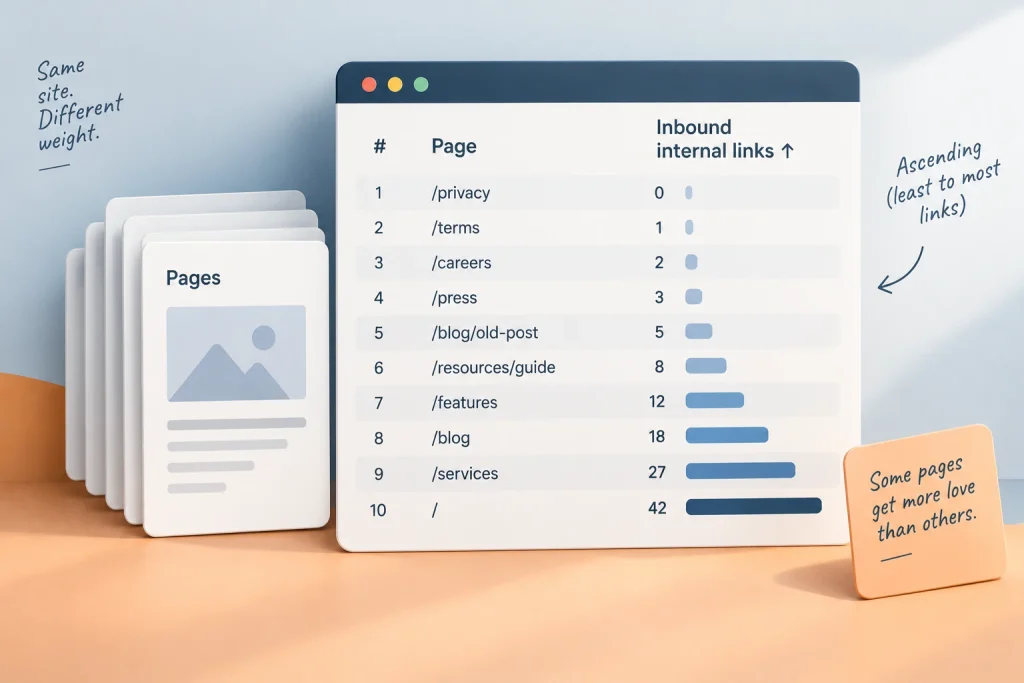
Home wins. Then About, Contact, and Privacy Policy. They win by a distance that is not close, because they sit in the header and footer and therefore appear on every single page you have ever published. Two hundred pages, two hundred links to a privacy policy nobody reads.
Now count the links pointing at the service page you would most like to rank. One, from the menu. Possibly two.
Nobody decided this. A development agency picked a theme, the theme had a footer, and the footer has been quietly allocating your site’s authority ever since.
Our SEO strategy page calls internal linking the one lever you control completely. This is what controlling it looks like in practice, and the first step is finding out what you are currently doing.
The template made the decision
Internal links do two jobs. They help Google find pages, and they pass some measure of a page’s standing to the pages it links to.
The second job is the one worth attention, because it means your site has a fixed quantity of standing that gets distributed across its pages according to how they link to each other. Distribution is not neutral. Something always receives most of it.
On a template-built site, that something is whatever appears in the global navigation. Which was chosen for usability, or for a client’s preference, or because the theme demo had those five items.
The practical consequence: your most linked pages are usually your least commercially important ones. Legal pages, an About page, a careers page nobody applies through. Meanwhile the pages you built the site to sell from are sitting on one link each.
You do not fix this by stuffing the footer. You fix it in the body text, where links are earned by relevance and carry more weight for it.
Authority pools in the blog and stays there
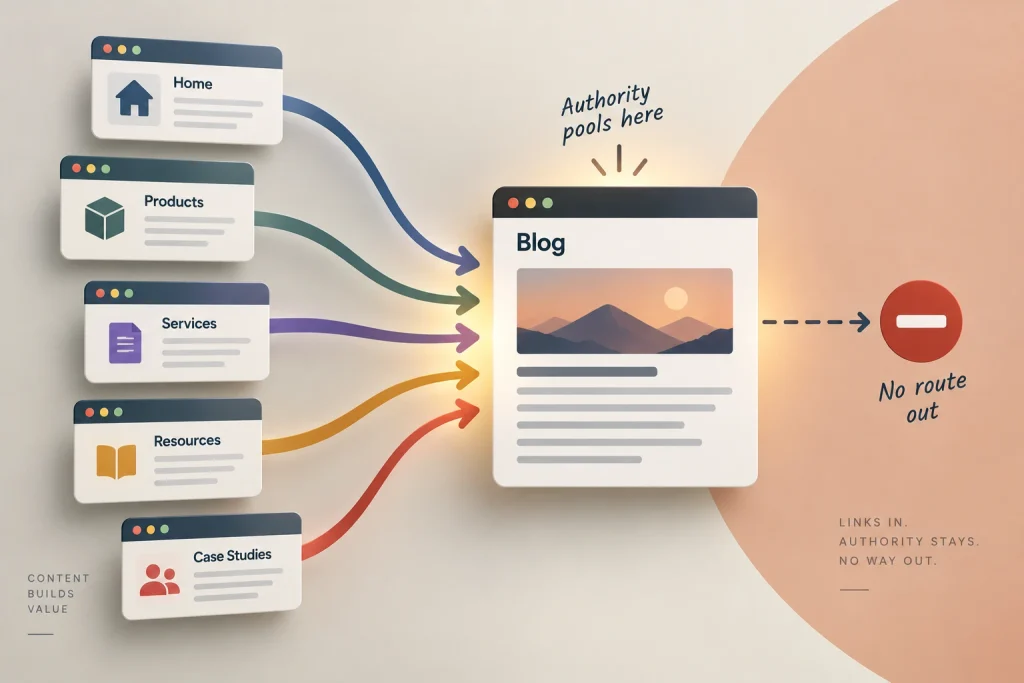
Here is the specific failure, and it is close to universal.
Writers link articles to other articles. That is a natural instinct — you are writing about a subject, a related article exists, you link it. Over two years of publishing you build a dense, well-connected blog.
Writers do not link articles to service pages. It feels like selling inside something that was supposed to be useful, and most content teams have an unspoken rule against it.
So the site develops a pool. External links arrive at articles, because articles are the only thing anyone links to. Internal links move that standing around inside the blog. And the service page — the page with the enquiry form on it — sits outside the circuit entirely.
Our article on link building ends on the observation that nobody will ever link to a page titled “Performance Marketing Agency in Mumbai.” That is true and it is not the end of the story. Internal links are the only route by which a commercial page receives any standing at all. If your writers will not build that route, the page does not get one.
The fix is unglamorous. Every article gets one or two links into a commercial page, placed where a reader who wanted help would actually want them — at the point in the article where the work being described starts to sound like a project. Not in the introduction. Not as a banner. In the paragraph where the reader thinks this is more than I want to do myself.
The near-orphan is the real problem

Everyone covers orphan pages — pages with no internal links pointing at them. They are rare, they are usually mistakes, and any crawl finds them.
The dangerous category is the near-orphan: a page with technically one or two links, both of them useless.
A blog post from March that is now on archive page seven. A case study reachable only from a dropdown. A location page linked from a sitemap file and nothing else. These pages are indexed, they are live, they are working, and they receive almost nothing from the rest of the site.
Campaign landing pages are the extreme version, and we have written separately about why a landing page sits outside the site — deliberately, in that case, which is a different situation from doing it by accident.
The test is simple. Has any human ever linked to this page from inside a sentence? If the only links are automated — archives, sitemaps, related-post widgets — treat it as unlinked.
The subdomain question, which is common here
A great many Indian SME sites were built by a development shop that put the blog somewhere convenient. Sometimes that is a /blog folder on the main domain. Often it is a blog. subdomain, because it was easier to install a separate WordPress there and hand it to the marketing team.
Those two choices behave differently, and the difference is exactly the subject of this article.
A subfolder keeps every page on one host. Links between your articles and your service pages are ordinary internal links, and nothing about the relationship is ambiguous.
A subdomain introduces a question. Google has described handling subdomains as separate properties in some contexts and as part of the same site in others, and the honest position is that the treatment is not fully documented and has changed over time. What is certain is that you have introduced a question you did not need to have — and you did it to the boundary between where your authority is earned and where your money is made.
If you are choosing now, choose the subfolder. If you already have a subdomain and the blog is performing, migrating is a real project with real risk, and doing it badly is worse than leaving it. Get the internal links right within what you have first, and revisit the move only when something else forces a rebuild.
Anchor text, and where the free part stops
External anchor text is a policed signal. Internal anchor text is yours, and it tells Google what the destination page is about.
Three rules cover almost all of it. Describe the destination rather than the action, so no “click here” and no bare URLs. Vary the phrasing across pages, because forty identical anchors read as a template rather than forty independent opinions. And place the link inside a sentence where it makes sense to a reader who is not thinking about SEO at all.
That last one is the whole test. If removing the link would make the sentence better, the link is in the wrong place.
“How many links per page” has no answer
It gets asked constantly and every published figure is invented. There is no documented limit, no documented optimum, and no reason to think one number would suit a 400-word update and a 3,000-word guide equally.
What does distinguish links is where they come from.
A link written into a sentence by a person who decided that page was relevant carries a judgement. A link generated by a related-posts widget carries none — the same widget produces the same links on every article in the category, which makes it a template feature rather than an editorial signal. Sidebar promotions, footer link farms and automated tag clouds sit in the same bucket.
So the useful count is not links on the page. It is links a human put there on purpose, and on most sites that number is between zero and two per article.
Raise it to three or four, aimed deliberately, and you have done more than any plugin will do for you.
What this cannot do
Internal linking redistributes. It does not create.
A site with almost no external authority, linked internally with great care, is dividing a very small amount very well. That is worth doing — it is free, it is fast, and it is entirely in your hands — but it will not substitute for the harder work of being cited by other people.
It also will not fix a page that does not deserve to rank. Pointing thirty internal links at a thin service page produces a well-linked thin page.
And it will not rescue a query you were never going to reach. Choosing the right target is a separate discipline, and we have written about why your tool’s difficulty score misleads you on exactly that.
The audit, in an afternoon
No paid tool required.
Open Search Console and find the Links report. It lists your top internally linked pages. Read the top twenty and note how many are commercial. On most sites the answer is one or two.
Then list your ten most important commercial pages — the ones you would name if a client asked what you sell. Search your own site for each one’s URL to see which pages reference it. Anything with fewer than five body-text links from real articles goes on a list.
Then take your best-performing articles by traffic and open each one. Ask where a reader would want a route to a commercial page, and put one there. Ten articles, one link each, an afternoon.
That is the whole exercise, and it is the highest-return hour available to a small Indian business doing its own SEO, because the asset already exists and you are only deciding where it goes.
Final thoughts
Somebody is already allocating your site’s authority. Right now it is a footer that was configured before you had a marketing plan.
If you would like us to run the audit and hand back the specific list of links to add, you can reach out to us on whatsapp at +91 7738844851 .
More in Blog
Keep reading
All articles →


Ready to talk about your growth?
Tell us what's stuck and we'll tell you what we'd do first. Free, 30 minutes, no pitch.