Instagram Carousel: How to Build One That Gets Saved and Sent
How to make an Instagram carousel that gets saved and shared: the 20-slide limit, the right size, and a slide-by-slide structure with Indian examples.

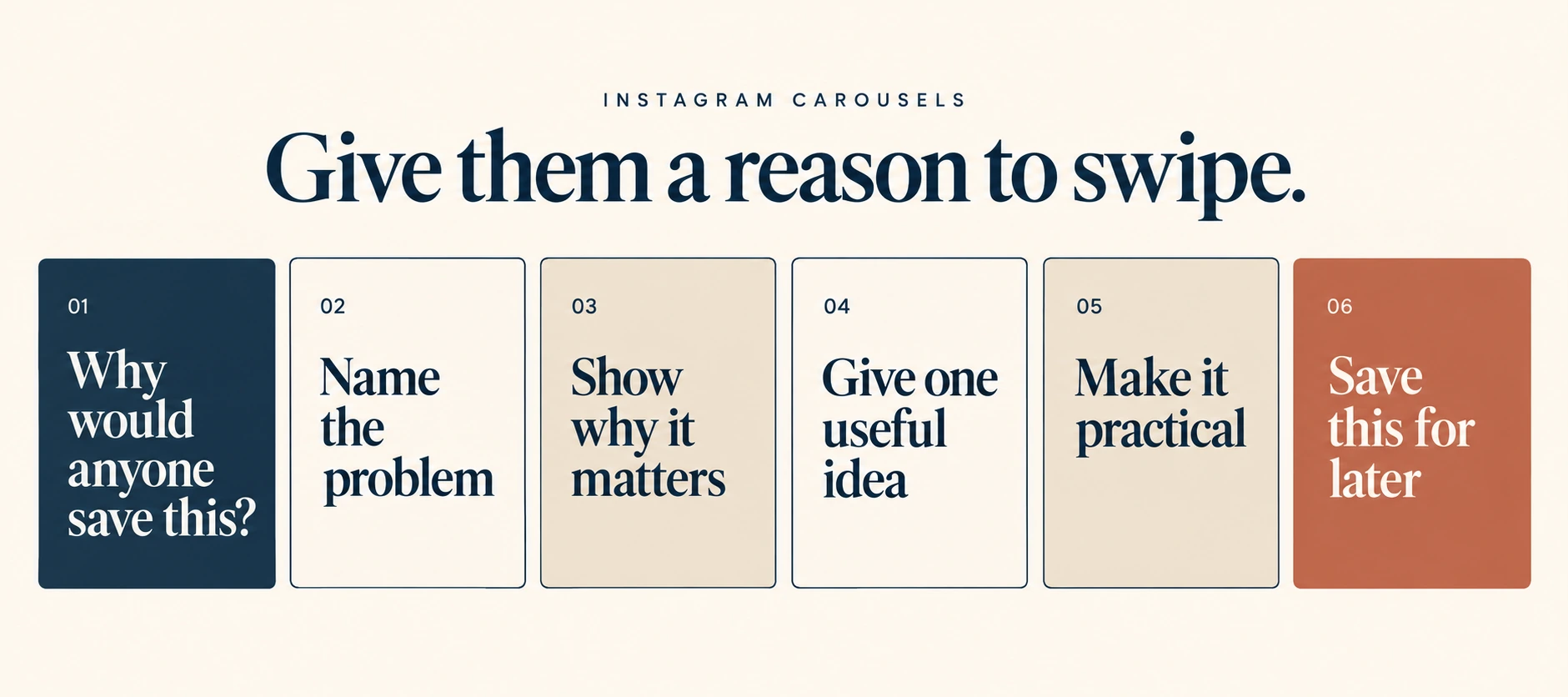
The short answer
An Instagram carousel is a single post with up to 20 photos or videos that people swipe through. Instagram doubled the limit from 10 to 20 in August 2024. Use a portrait size, 1080 × 1350 pixels (4:5), and keep every slide the same ratio. Carousels are the best-performing feed format in Socialinsider’s 2026 benchmark: 0.55% average engagement against 0.52% for Reels and 0.37% for single images. They work because people save them and send them to others. Build each one in four parts: hook, build, pay, ask.
Key takeaways
- Up to 20 slides, but 7 to 10 is the practical range for most business topics
- Portrait 4:5 (1080 × 1350) uses the most screen space in the feed
- Slide 1 decides everything. If it doesn’t stop the scroll, slides 2 to 20 don’t exist
- Carousels are a sends-and-saves format. Measure sends per reach, not just likes
- Every slide should make sense on its own, because people screenshot and share single slides
Why carousels work for business accounts
Reels are the best format for reaching strangers. Carousels are the best format for being useful.
Instagram’s head, Adam Mosseri, named watch time, likes and sends as the three signals that matter most. A carousel earns time (people read each slide) and sends (people forward something useful). A checklist of GST invoice fields gets sent to the accountant. A carousel of five mistakes in home loan applications gets sent to a spouse.
They are also cheap to produce. A team without a video editor can make a good carousel in Canva in an hour.
Specs in one place
- Slides: 2 to 20 photos or videos, mixed if you like
- Size: 1080 × 1350 px (4:5 portrait) for most posts. Square 1080 × 1080 also works
- Ratio: Every slide takes the ratio of the first one. Design them all at one size
- Video slides: Allowed, and can mix with images
- Text: Keep it inside the centre area. The edges can be hidden in grid previews
- Caption: One caption for the whole carousel
The Hook–Build–Pay–Ask structure
Our structure for business carousels. It works for 7 slides or 12.
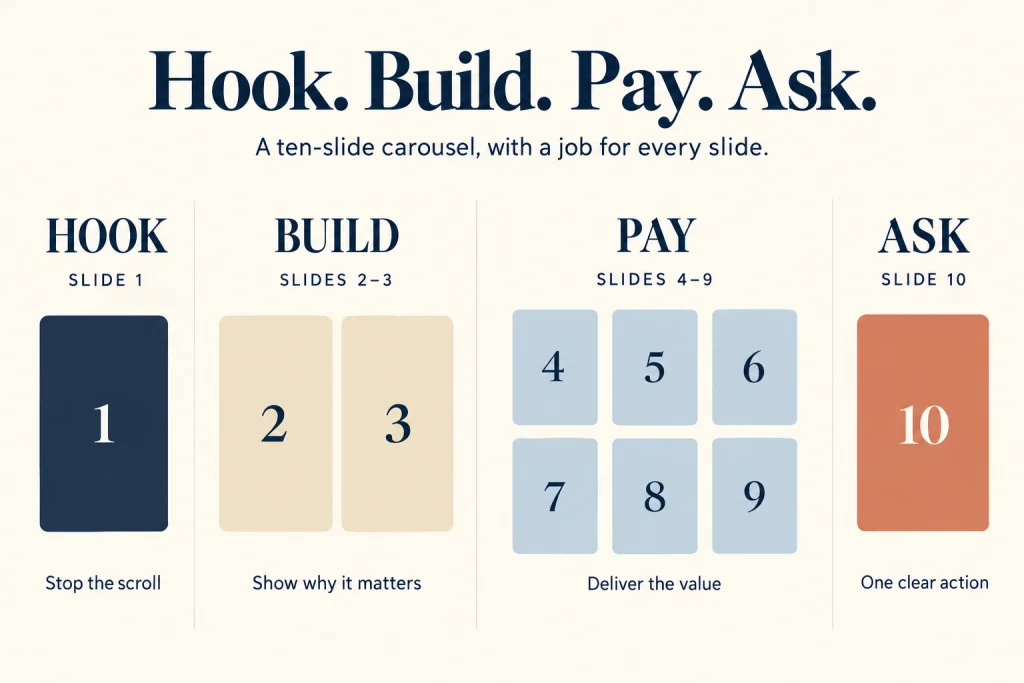
Hook (slide 1)
One promise, in large type, readable in two seconds. It should name the reader or the problem.
- “5 GST invoice mistakes that delay your input credit”
- “Buying a flat in Thane? The costs nobody puts in the brochure”
- “Your skincare is fighting itself. Don’t mix these 4”
Avoid your logo as the main element, and avoid a vague title like “Tips for success”.
Build (slides 2–3)
Set up why it matters. A number, a consequence, a quick story. This slide earns the swipe to the good part.
“On a ₹1.2 crore flat, stamp duty and registration add roughly ₹7 lakh. Most buyers budget for neither.” (Illustrative; state the local rate you’re using.)
Pay (slides 4 to second-last)
The value. One idea per slide. Short sentences. Big type. If a slide needs a paragraph, split it.
Useful patterns:
- Numbered steps: “Step 3: Check the HSN code matches the item”
- Before and after: a bad caption vs a good one
- Myth vs fact: “Myth: more hashtags = more reach. Fact: the limit is five”
- Mini case: problem, what changed, result
Ask (last slide)
One action. Not four.
- Send it: “Send this to the person who files your GST”
- Save it: “Save this for your next site visit”
- Comment for a resource: “Comment CHECKLIST and we’ll DM you the PDF.” Set this up with comment-to-DM within Meta’s rules
The best business carousels ask for a send, because sends matter most for reaching non-followers.
Twelve carousel ideas for Indian businesses
- Checklist: “Documents to keep ready before you apply for a business loan”
- Myth vs fact: “What the new labour codes change for a 20-person company” (verify every claim)
- Cost breakdown: “What a ₹15 lakh kitchen renovation actually pays for”
- Before and after: a client’s old website vs new, with the result
- Comparison: “Term plan vs ULIP in plain words” (for regulated categories, keep to facts and get compliance sign-off)
- Mistakes: “6 mistakes first-time exporters make on paperwork”
- Process: “What happens after you book a site visit with us”
- Glossary: “10 terms your CA uses and what they mean”
- Framework: your own model, explained slide by slide
- Data: one chart per slide from a public report, with the source on each slide
- Customer questions: the five DMs you get every week, answered
- Behind the scenes: how a product is made, with one fact per slide
Carousels vs Reels
It isn’t either/or.
Reels bring new people in. They are recommended heavily to non-followers.
Carousels give people a reason to save, send and follow. They work well for depth.
A practical mix for a small team: three Reels and one or two carousels a week. Then turn your best carousel into a Reel script, and your best Reel into a carousel. Reusing your own ideas in a new format is fine. Reposting other people’s content is what Instagram penalises.
Mistakes to avoid
Too much text on a slide. If it needs zooming, it gets skipped.
A first slide that’s all brand. Logo, brand colours, no promise. Nobody swipes.
Different ratios across slides. Instagram crops everything to the first slide’s ratio.
Twenty slides because you can. Stop when the value stops.
No reason to send. A carousel that only sells has nothing worth passing on.
Running the same design for months. People stop noticing. The same creative fatigue that hits ads hits organic posts.
When carousels are the wrong choice
If the goal is reaching people who have never heard of you, lead with Reels. If your content is emotional, visual or about motion (food, fitness, fashion), video usually wins. Carousels are strongest for teaching, comparing and explaining.
Checklist
- 1080 × 1350 px, all slides the same ratio
- Slide 1 names the reader or the problem in under 10 words
- Build slide explains why it matters
- One idea per slide in the Pay section
- One clear ask on the last slide (send, save or comment)
- Caption’s first line repeats the promise with a searchable keyword
- Sources on any slide with data
- Tracked: saves, sends per reach, follows from post
Questions we get asked
How many slides should an Instagram carousel have?
Up to 20 are allowed. Seven to ten covers most business topics.
Can I add music to a carousel?
Yes, Instagram lets you add music to photo carousels in most regions.
Can a carousel be a collab post?
Yes. Carousels can be published as a collab post to appear on two or more profiles.
How do I know if a carousel worked?
Look at saves and sends per reach, and follows from the post. Our guide explains sends and saves per reach.
Final thoughts
Carousels are the workhorse of a practical you can reach out to us on whatsapp at +91 7738844851 cheap to make, easy to save, easy to send.
If you’d like a set of carousel templates built around your content pillars, book a consultation with our team.
More in Blog
Keep reading
All articles →
Ready to talk about your growth?
Tell us what's stuck and we'll tell you what we'd do first. Free, 30 minutes, no pitch.